Download and install VocabReader

Choose Windows or macOS, download the version for your computer, then follow the steps below to install it.

Free download · Early Preview · No Microsoft Store required

Latest version Loading… GitHub Releases

Choose your computer

We select a likely match automatically. You can switch at any time.

Install on Windows

For 64-bit Windows 10 or 11. The installer comes directly from the project's official GitHub Releases page.

Download for Windows (x64) VocabReader Windows x64 setup (.exe)
  1. Download and open the installer

    Save the .exe file, then double-click it from Downloads.

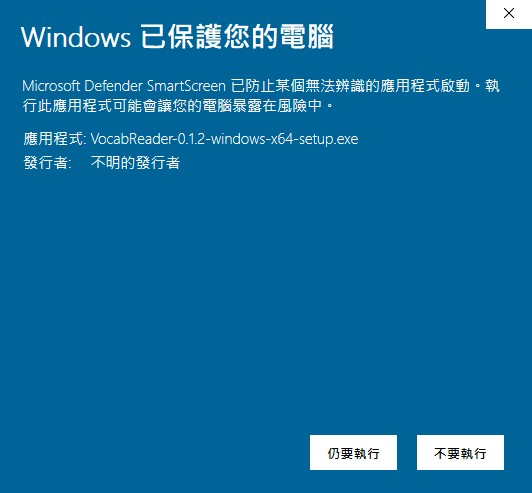
  2. If Windows shows a protection message

    Select More info, then select Run anyway to continue installing VocabReader.

  3. Finish setup

    Complete the installer and open VocabReader from the Start menu.
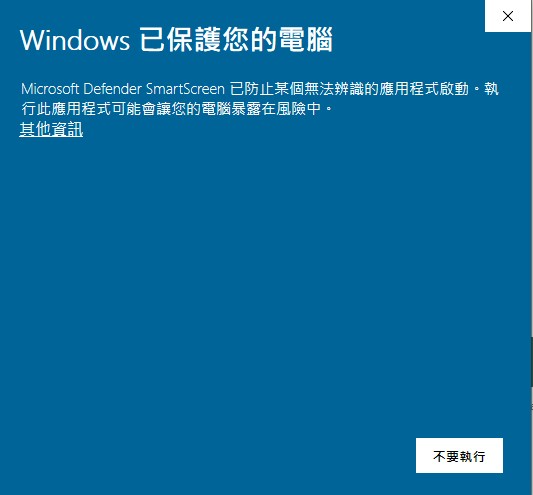
Windows SmartScreen message before More info is selected
1. Select More info When this message appears, select More info.
Windows SmartScreen message after More info is selected, showing the Run anyway button
2. Select Run anyway After the details appear, select Run anyway to continue.

Install Codex to enable AI Tutor

This is a one-time setup. Choose your computer and follow the four steps below.

Already installed Codex? Start from step 3.

  1. Open PowerShell

    Press the Windows key, type PowerShell, then open Windows PowerShell. Keep this window open for the next two steps.

  2. Install Codex

    Select Copy install command, paste it into PowerShell, then press Enter and wait for it to finish.

    powershell -ExecutionPolicy ByPass -c "irm https://chatgpt.com/codex/install.ps1 | iex"
  3. Sign in with ChatGPT

    Copy the login command, paste it into the same PowerShell window, and press Enter. Your browser will open for sign-in.

    codex login
  4. Return to VocabReader

    Complete the ChatGPT sign-in in your browser, then close and reopen VocabReader. AI Tutor is ready to use.

What you can verify before installing

The source, build history, release files, and license are public.

MIT License

The license permits inspection and modification under its terms.

Read the license

Visible build history

Review the public GitHub Actions runs used by the project.

View GitHub Actions

Installed? Start with one EPUB.

Open VocabReader, import a book, and ask AI Tutor about a passage.